3D Paper Bunny Egg Basket Easter Box
Easter is a season defined by sweetness, springtime renewal, and the joy of giving. For crafters, educators, and small business owners, this holiday presents a unique opportunity to create memorable experiences through handmade gifts. One of the most popular ways to achieve this is by crafting a 3D Paper Bunny Egg Basket Easter Box. This isn't just another flat card or simple envelope; it is an interactive, three-dimensional structure that captures attention and delight. However, while the end result looks intricate and professional, the process can be streamlined significantly with the right digital assets. Many creators stumble not because they lack skill, but because they choose the wrong file formats or overlook critical assembly details before they even pick up their cutting machines.
Why Choose a 3D Digital Cut File?
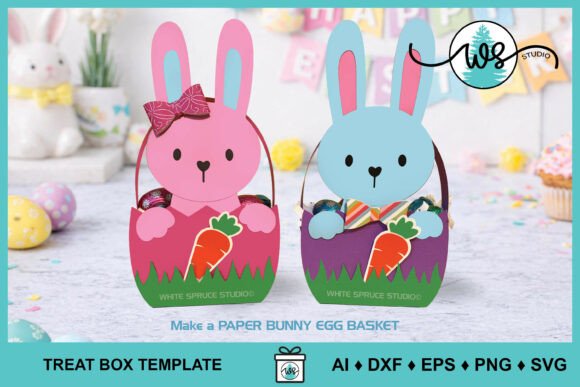
The shift toward digital crafting has transformed how we approach paper engineering. Instead of buying expensive, pre-made kits that limit your customization options, you can download vector files that allow for infinite variation in size, color, and material. The 3D Paper Bunny Egg Basket Easter Box template, designed by White Spruce Studio, exemplifies this advantage. It offers clean lines and layered details that are specifically optimized for cutting machines like Cricut or Silhouette.
For entrepreneurs running craft fairs or Etsy shops, this distinction is vital. A high-quality SVG file allows you to produce consistent, professional-grade products at scale. For hobbyists, it means the difference between a frustrating afternoon of trial and error and a satisfying hour of creative assembly. The ability to resize these vector files means you aren't locked into one specific dimension. You can adapt the basket to hold large chocolate bunnies for adults or tiny jelly beans for toddlers, making it a versatile tool in your crafting arsenal.
Common Pitfalls in Choosing Digital Craft Files
While the concept of a printable or cuttable design is simple, the execution often trips up both beginners and experienced makers. Understanding what you are actually purchasing is the first step toward avoiding disappointment. Here are the most common mistakes people make when acquiring files for projects like the bunny egg basket.
- Misunderstanding File Formats: Not all "SVG" files are created equal. Some listings offer only PNGs (raster images) disguised as vector files. If you try to cut a PNG, your machine will cut around the entire square image rather than following the precise paths of the bunny ears and basket weave. Always verify that the package includes true vector formats such as AI, DXF, EPS, and SVG. These formats ensure that your cutting blades follow exact coordinates, resulting in clean edges without jagged artifacts.
- Ignoring Assembly Instructions: A complex 3D box requires more than just cutting out shapes. It requires understanding the fold lines, glue points, and layering order. Many users skip the PDF instructions, assuming the visual cues in the SVG are enough. Without step-by-step color photos showing exactly where tabs go and which side faces up, you risk assembling the basket upside down or missing critical structural supports. This leads to wobbly boxes that collapse under the weight of candy.
- Overlooking Material Compatibility: The success of a 3D paper project relies heavily on the cardstock you choose. Using standard printer paper will result in a flimsy structure that cannot hold its shape. Conversely, using overly thick chipboard may prevent the delicate layers from nesting correctly inside the cutting machine. The default size of this particular basket—approximately 3.75 inches wide by 7.25 inches high including ears—is designed for medium-weight cardstock (around 65-80 lb). Deviating significantly from this recommendation without adjusting cut settings can lead to incomplete cuts or machine jams.
How Mistakes Impact Your Results
When these errors occur, the consequences extend beyond mere frustration. For a classroom teacher preparing Easter baskets for thirty students, a faulty file or unclear instruction manual can turn a fun activity into a logistical nightmare. Time spent troubleshooting cut settings or deciphering ambiguous diagrams is time taken away from actual teaching or interaction.
For small business owners, the impact is financial. A product that looks amateurish due to poor alignment or weak construction damages your brand reputation. Customers expect the polished look shown in promotional images. If the physical product lacks the structural integrity or aesthetic precision of the digital preview, returns increase, and reviews suffer. Furthermore, if you attempt to resize a non-vector file, the quality degrades rapidly, leading to blurry prints and misaligned cuts that render the item unsellable.
Best Practices for a Successful Project
To ensure your 3D Paper Bunny Egg Basket Easter Box turns out beautifully every time, adopt a methodical approach to preparation and assembly. Start by verifying the contents of your download. A comprehensive package should include a ZIP file containing AI, DXF, EPS, PNG, and SVG formats, along with a detailed PDF instruction manual featuring color photographs. This variety ensures compatibility regardless of your software or hardware preferences.
Before loading your cardstock, test the design on scrap paper. This "dry run" helps you identify any potential issues with scaling or layering. Pay close attention to the resizing instructions provided in the Design Space guide. While the vector files allow for easy resizing, changing the dimensions also changes the ratio of glue tabs to surface area. If you scale up too much, the tabs might become too large to hide neatly; scale down too much, and they may not provide enough adhesion surface.
When assembling, patience is your best tool. Follow the color-coded steps in the PDF instructions meticulously. Use a bone folder to score the fold lines sharply before bending the paper. This creates crisp, professional-looking angles that define the 3D structure. When gluing, apply adhesive sparingly to the tabs to avoid seepage, which can mar the appearance of your chosen cardstock color. Allow sufficient drying time between layers to ensure the final box stands rigid and upright.
Evaluating Value Before You Buy
Not all digital templates offer the same level of support. When evaluating a product like the White Spruce Studio design, look for evidence of thoroughness. Does the listing explicitly mention inclusion of step-by-step photo instructions? Are multiple file formats listed? Is there information regarding technical support or updates? These factors indicate a creator who understands the user experience and stands behind their product.
Additionally, consider the versatility of the design. Can the file be used for other occasions? By removing the bunny ears or changing the color scheme, a well-designed template can serve as a generic treat box for birthdays or baby showers. This versatility increases the value proposition, allowing you to use the same digital asset across different seasons and marketing campaigns.
Ultimately, the goal of crafting a 3D Paper Bunny Egg Basket Easter Box is to share joy. Whether you are handing a sweet gift to a neighbor or selling a handmade treasure at a local fair, the quality of your work reflects your care. By choosing high-quality, well-documented digital files and avoiding common technical pitfalls, you ensure that the focus remains on the delight of the recipient, not the difficulties of the maker. Take the time to prepare properly, respect the instructions, and trust the process. The result will be a stunning, sturdy, and adorable basket that truly stands out in a sea of mass-produced alternatives.