Nativity Scene 3D Layered SVG Cut File
The holiday season brings with it a unique blend of nostalgia, tradition, and the desire to create meaningful spaces. For crafters, designers, and DIY enthusiasts, the challenge often lies in translating digital concepts into tangible, breathtaking art that captures the spirit of Christmas. Enter the Nativity Scene 3D Layered SVG Cut File, a versatile digital resource designed to bridge the gap between simple flat designs and immersive three-dimensional artwork. This guide explores how this specific file format can transform your crafting projects, offering both professional-grade results and accessible fun for hobbyists.
Understanding the Digital Foundation
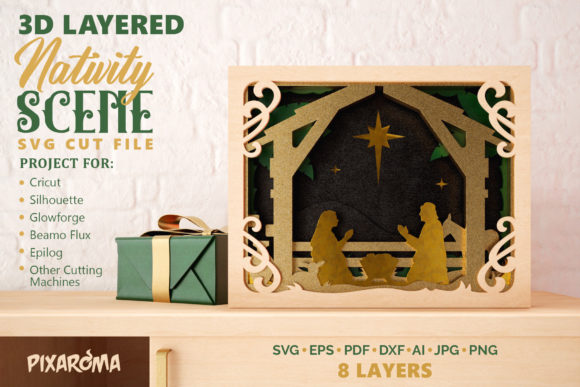
At its core, an SVG (Scalable Vector Graphics) file is a digital blueprint. Unlike raster images such as JPEGs or PNGs, which are made of pixels and lose quality when resized, vector files use mathematical equations to define shapes. This makes them ideal for cutting machines like Cricut, Silhouette, and other electronic cutters. The Nativity Scene 3D Layered SVG Cut File is not just a single image; it is a structured collection of eight distinct layers, each representing a different depth plane of the nativity scene.
This layered approach allows for the creation of what is known as a "shadowbox" effect. Instead of a flat silhouette, the final product has volume and perspective. By stacking these layers, you create a sense of distance, allowing the viewer’s eye to travel from the foreground figures—perhaps Mary, Joseph, and the baby Jesus—to the background elements like the star of Bethlehem or distant hills. This depth transforms a standard paper craft into a piece of decorative wall art sculpture.
Material Versatility: From Cardstock to Plywood
One of the most compelling features of this digital cut file is its adaptability to various materials. While many assume layered art is strictly for paper, the precision of the SVG cuts opens up possibilities for more durable and textured mediums.
Paper and Cardstock
For beginners or those looking for quick, colorful projects, cardstock is the go-to material. It is affordable, easy to handle, and comes in a vast array of colors and finishes. When using cardstock, the key to success lies in the spacing. To achieve the true 3D look, you cannot simply glue layers directly on top of one another. Doing so creates a flat, compressed appearance that defeats the purpose of the layered design.
Wood and Plywood
For a more rustic, elegant, or permanent display, wood is an excellent choice. Cutting thin plywood or basswood with a laser cutter or high-power blade allows for intricate details that hold their shape beautifully. Wood adds weight and stability, making the finished sculpture feel substantial and premium. However, working with wood requires different spacing techniques than paper, as seen below.
Other Creative Mediums
Crafters have also successfully used foam board, felt, and even acrylic sheets. Each material offers a different aesthetic: foam provides lightweight cushioning, felt offers softness, and acrylic introduces a modern, translucent glow, especially effective if backlit.
The Art of Assembly: Creating Depth and Dimension
The magic of the Nativity Scene 3D Layered SVG Cut File is realized during the assembly phase. The process is methodical but rewarding. Here is how to ensure your project achieves maximum visual impact.
- Download and Prepare: Begin by downloading the digital file to your computer. Upload it into your cutting software, ensuring that the layers are correctly named and ordered. Most files come with a guide indicating which layer is the background and which is the foreground.
- Cutting: Load your chosen material into your cutting machine. Follow the manufacturer’s recommendations for blade depth and pressure. For complex layers, you may need to make multiple passes or use a deeper cut setting.
- Stacking and Spacing: This is the most critical step. To maintain the 3D effect, you must introduce space between each layer.
- For Cardstock: Use double-sided adhesive foam dots, tabs, or tape. These spacers lift each layer slightly above the one beneath it, creating shadow lines that enhance depth.
- For Wood: Use acrylic spacers, wooden dowels, or specialized foam risers. Gluing wood layers directly together will result in a flat look, losing the height and dimension intended by the designer.
- Final Assembly: Carefully stack the layers in the correct order, securing them with your chosen spacers. Ensure alignment is precise to prevent any shifting that could ruin the visual balance.
By avoiding direct gluing between layers, you preserve the architectural integrity of the design. The resulting piece will cast subtle shadows within itself, adding a dynamic quality that changes depending on the lighting in the room.
Design Features and Aesthetic Appeal
The Nativity Scene 3D Layered SVG Cut File - Christmas Decorative Wall Art Sculpture is meticulously crafted with eight distinct layers. This number strikes a perfect balance between complexity and manageability. Fewer layers might lack sufficient depth, while too many could become unwieldy or fragile. The eight-layer structure allows for detailed representation of key nativity elements without overwhelming the viewer.
The design is intended to be viewed as decoration wall art. Whether framed inside a complementary shadow box or mounted directly onto a wall, the piece serves as a focal point. The contrast between the layered figures and the negative space creates a sophisticated look that fits well in modern, traditional, or eclectic home decor styles. The ability to choose your own color palette means you can customize the scene to match your existing interior design—opting for classic reds and greens, neutral earth tones, or even monochromatic schemes for a contemporary vibe.
Who Benefits from This Craft?
This digital asset is suitable for a wide range of users, each benefiting in different ways:
- Home Decorators: Individuals seeking unique, handmade accents for their living rooms or entryways will appreciate the customizability and personal touch of a layered nativity scene.
- Small Business Owners: Etsy sellers and craft fair vendors can produce high-value items quickly. Because the file is digital, there is no inventory cost for the design itself, only the materials. This allows for scalable production of premium-priced wall art.
- Educators and Parents: For family craft projects, this file offers a challenging yet achievable activity. It teaches spatial reasoning, patience, and fine motor skills while creating a lasting holiday memory.
- Churches and Community Centers: Groups looking for budget-friendly yet impressive decorations for Christmas services or events can use this file to create large-scale installations.
Practical Considerations and Limitations
While the Nativity Scene 3D Layered SVG Cut File offers immense creative potential, it is important to set realistic expectations. First, success depends heavily on the quality of your cutting machine and the precision of your cuts. Dull blades or incorrect settings can lead to jagged edges or incomplete cuts, particularly in the smaller, more intricate parts of the design.
Secondly, the time investment should not be underestimated. Cutting eight layers, especially in wood or thick cardstock, takes time. Assembly requires patience and attention to detail. Rushing the spacing process can lead to a lopsided or uneven final product.
Additionally, consider the durability of your materials. Paper crafts are delicate and best kept indoors away from high traffic areas. Wood and acrylic versions are more robust but heavier, requiring secure mounting hardware to prevent accidents.
Evaluating Suitability for Your Needs
Before purchasing or downloading this file, ask yourself what you hope to achieve. If you are looking for a quick, disposable decoration, this might be overkill. However, if you want to create a heirloom-quality piece that showcases your craftsmanship and adds a profound artistic element to your holiday decor, this file is an excellent choice.
It is also worth considering your skill level. While the instructions are straightforward, the multi-layer aspect requires a bit of practice. If you are new to layered paper crafts, start with cardstock to master the technique before moving on to wood. The learning curve is gentle, and the satisfaction of seeing the 3D form emerge from flat sheets is unparalleled.
Conclusion
The Nativity Scene 3D Layered SVG Cut File represents a fusion of traditional storytelling and modern digital crafting. It empowers creators to produce stunning, dimensional art that honors the nativity story in a visually striking way. By understanding the importance of layering, material selection, and proper spacing, anyone can bring this digital blueprint to life. Whether used as a cherished family keepsake, a business product, or a community decoration, this file offers endless possibilities for creativity and expression during the Christmas season.