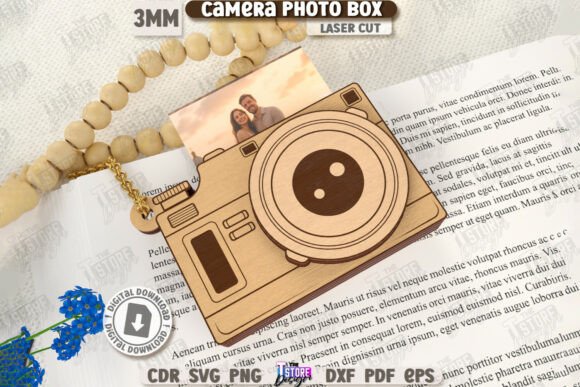
3D Camera Shaped Photo Box Laser Cut CNC
Creating a tangible, interactive gift often feels like the missing piece in an increasingly digital world. The 3D Camera Shaped Photo Box Laser Cut CNC design offers a compelling solution for crafters, hobbyists, and small business owners looking to produce high-quality, personalized items. This specific design allows you to create a layered, pop-up style box that resembles a vintage camera, complete with space for photos and decorative elements. It is not merely a static container; it is an experience that unfolds when opened.
However, transitioning from a digital file to a physical masterpiece requires more than just pushing a button on your laser cutter. There are technical nuances, software compatibility issues, and material considerations that can make or break the final product. Understanding these details upfront will save you time, reduce waste, and ensure your finished piece looks professional rather than amateurish.
Understanding the Digital Asset
When you purchase this digital product, you are receiving a zip archive containing multiple file formats: SVG, EPS, PNG, PDF, and DXF. Each format serves a distinct purpose, and knowing how to use them correctly is critical for success. The core instruction provided with the files is straightforward:
- Red lines indicate where the machine should CUT.
- Black lines indicate where the machine should ENGRAVE.
This color-coding system is standard in laser cutting workflows, but it relies heavily on your software interpreting the colors correctly. If your software assigns different layer properties to these colors, your cuts may fail, or you might accidentally engrave over cut lines, ruining the structural integrity of the box.
File Format Selection Matters
One of the most common pitfalls involves choosing the wrong file format for your specific software. While SVG files are popular because they are vector-based and scalable, they can sometimes cause issues depending on the engine your laser control software uses. Specifically, users of LightBurn have reported dimensional distortions when working with SVG files. This distortion can lead to pieces that do not fit together seamlessly, resulting in gaps or misaligned layers in your 3D camera box.
To avoid this, it is highly recommended to use the DXF file format if you are using LightBurn. DXF files tend to maintain their geometric accuracy better within this specific environment, ensuring that the intricate details of the camera lens, shutter buttons, and layered photo slots align perfectly. For other software platforms, such as CorelDRAW or Adobe Illustrator, the EPS or AI (if available) files may offer smoother workflows, but always test a small section first.
Common Mistakes to Avoid
Even with the correct file format, several errors can occur during the production phase. Being aware of these potential issues allows you to preemptively adjust your settings and workflow.
Ignoring Material Thickness
The dimensions in the digital file are based on a standard material thickness, typically 3mm or 4mm acrylic or wood. If you switch materials without adjusting the design, the fit will be off. A slight variance in thickness can cause the layers to bind too tightly, preventing the pop-up mechanism from functioning, or leave gaps that look sloppy. Always measure your material precisely before importing the file into your cutting software.
Overlooking Engraving Depth
The black lines are designated for engraving, which adds texture and detail to the camera body, such as grain patterns or brand logos. However, excessive engraving depth can weaken the material, especially around thin cut lines. If you engrave too deeply near a red cut line, the laser may burn through the edge, causing the piece to snap during assembly. Start with lower power settings for engraving and increase gradually until you achieve the desired contrast without compromising strength.
Neglecting Software Compatibility Checks
Not all laser cutting machines and software combinations handle vector data equally well. Before committing to a full production run, perform a test cut on scrap material. Check for:
- Alignment: Do the red and black lines correspond correctly to the intended actions?
- Fit: Do the interlocking tabs and slots fit together snugly?
- Quality: Are the edges clean, or is there excessive charring or melting?
Assembly and Presentation Tips
Once the pieces are cut, the assembly process is where the magic happens. The 3D Camera Shaped Photo Box relies on precise folding along scored lines (which may need to be added if not included in the file) to create the three-dimensional effect. Use a bone folder or a blunt tool to score the fold lines lightly before bending the material. This ensures crisp, clean folds that enhance the professional appearance of the final product.
For those selling these items, presentation is key. The layered nature of the box allows for creative customization. You can insert printed photos, handwritten notes, or even small trinkets into the designated slots. Consider adding a ribbon or a custom label to the front of the camera "lens" to elevate the gift’s perceived value. Since this item is marketed as a birthday gift or decorative piece, the tactile experience of opening the box is part of its appeal. Ensure that the pop-up action is smooth and satisfying.
Evaluating Your Choice
Before purchasing or starting a project with this design, consider your end goal. Are you making one-off gifts for friends, or are you planning to scale up production for a shop? If you are scaling, consistency is paramount. Investing in high-quality materials and mastering your machine’s settings will pay off in reduced rework rates. Additionally, verify that your target audience appreciates handmade, laser-cut goods. The market for personalized, niche decor items is robust, particularly among adults aged 20–50 who value unique, thoughtful gifts over mass-produced alternatives.
Furthermore, check the licensing terms of the digital file. Some creators restrict commercial use, while others allow it with attribution. Respecting intellectual property rights protects your business reputation and avoids legal complications. Look for clear statements regarding commercial usage rights in the product description.
Conclusion
The 3D Camera Shaped Photo Box Laser Cut CNC is a versatile and charming project that bridges the gap between digital design and physical craftsmanship. By paying attention to file formats, material specifications, and software compatibility, you can avoid common frustrations and produce stunning results. Whether you are a seasoned pro or a beginner exploring laser cutting for the first time, this project offers a rewarding challenge that yields a beautiful, functional keepsake. Take the time to test, refine, and personalize your approach, and you will find that the effort invested is well worth the impressive final outcome.